Inventory Setup - Pupsai Local

Let's get you one step closer to getting MORE customers and MORE help!

Pupsai can automate the creation of marketing campaigns, and upsell your products during conversations with customers if you allow access to your products, services or inventory.

To get started, ensure you are logged in to your Pupsai account. For help logging in, refer to Login to Pupsai.

From your dashboard:

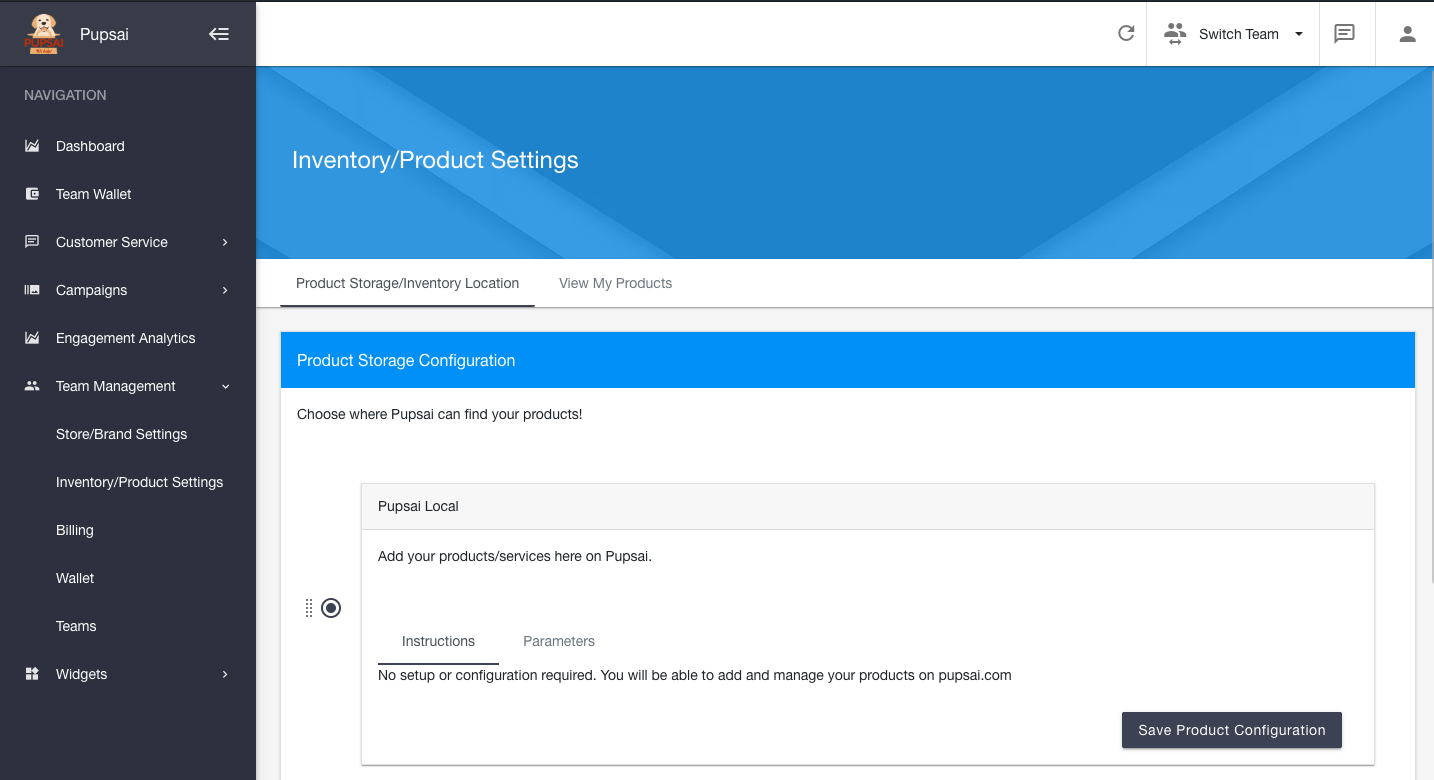
    1. In the navigation bar to the left of the page, select the "Team Management" menu option
    2. From the drop down menu, select "Inventory/Product Settings"
    3. You'll be redirected to the "Inventory/Product Settings" page
    4. Under "Product Storage Configuration", select the "Pupsai Local" option.
    5. As the instruction tab says, "No setup or configuration required. You will be able to add and manage your products on pupsai.com". 

Did you find this article useful?

  • Pupsai Registration

    Let's get you ready for MORE customers and MORE help with Pupsai. There are three (3) ways to regist...
  • Login to Pupsai

    Let's get you ready for MORE customers and MORE help with Pupsai. There are three (3) ways to login ...
  • Reset Password

    Let's get you ready for MORE customers and MORE help with Pupsai. If you have forgotten your passwor...
  • Team Setup

    Pupsai is team driven to ensure you get MORE customers and MORE help. To get started, ensure you are...
  • Inventory Setup - Shopify

    Let's get you one step closer to getting MORE customers and MORE help!Pupsai can automate the creati...