Subscribing to Pupsai

Subcribe to enjoy all the great features Pupsai has to offer you in getting MORE customers and MORE help.

To get started, ensure you are logged in to your Pupsai account. For help logging in, refer to Login to Pupsai.

From your dashboard:

  1. In the navigation bar to the left of the page, select the "Team Management" menu option
  2. From the drop down menu, select "Billing"
  3. You'll be redirected to the "Billing" page
  4. You can pay for your subscription by card (Visa, Mastercard, Amex, JCB or Discover) or PayPal
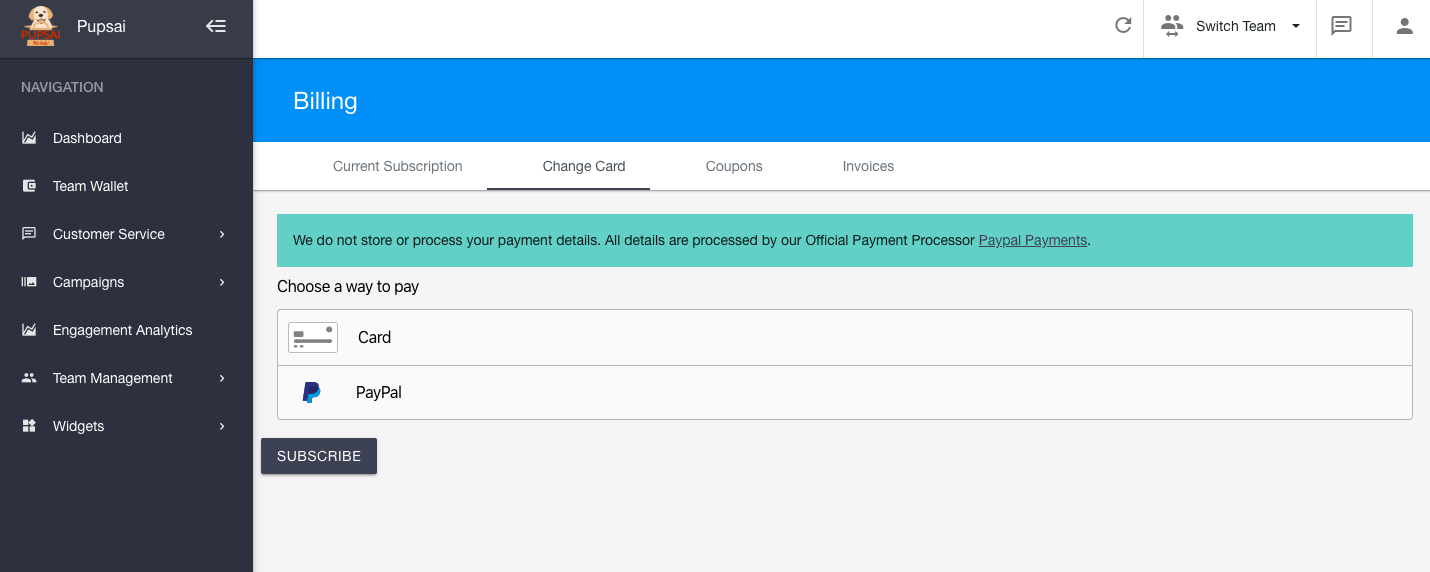


Using a Card to Pay
  1. Select the card option
  2. Enter card number
  3. Enter expiration date
  4. Click subscribe

Using a PayPal to Pay
  1. Select the PayPal option
  2. Click the "PayPal Checkout" yellow button
  3. You'll be redirected to login to your PayPal account 
  4. After you have successfully logged in, you'll be redirected to Pupsai
  5. Click subscribe

Did you find this article useful?

  • Pupsai Registration

    Let's get you ready for MORE customers and MORE help with Pupsai. There are three (3) ways to regist...
  • Login to Pupsai

    Let's get you ready for MORE customers and MORE help with Pupsai. There are three (3) ways to login ...
  • Reset Password

    Let's get you ready for MORE customers and MORE help with Pupsai. If you have forgotten your passwor...
  • Team Setup

    Pupsai is team driven to ensure you get MORE customers and MORE help. To get started, ensure you are...
  • Inventory Setup - Pupsai Local

    Let's get you one step closer to getting MORE customers and MORE help!Pupsai can automate the creati...